
Deep Dive into Agentic Browser Control: Privacy, Tech Stack & Product Design Insights
How to build a safe and reliable agent that controls your browser

Prototype In One Weekend
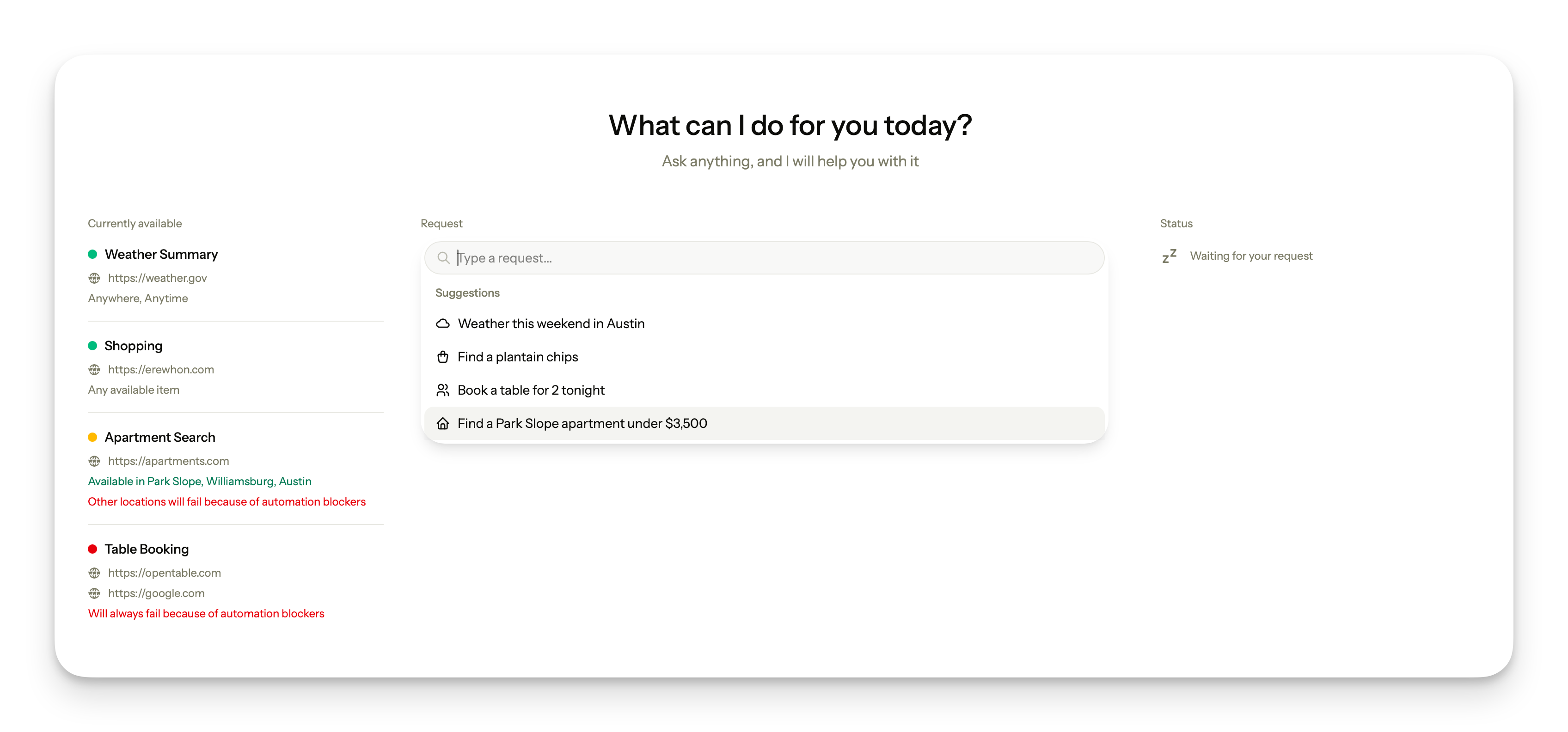
A couple of weeks ago, purely out of curiosity, I decided to build a browser control prototype: a small program that parses the user’s intent from text input with LLM, return a structured output, process the output through the scenario router, and then execute the scenario using the appropriate tool to control the user’s browser.
Why build something like that?
After watching recent tech companies’ presentations, I realized that they will push agentic control of user’s devices as far as they can. And, probably, many developers and teams are going to build products around it. So, as a curious person and a design engineer myself, I decided to learn a couple of things in this domain and expand my knowledge.
It took me a weekend to build a fully functional prototype with four scenarios available for execution, with a nice UI (thanks to almost 10 years of product design background) and a simple logging system.
Who is this for?
In this article I share my learnings and thoughts, explain limitations and practical tradeoffs, and suggest the approach to build this kind of products in the most reliable, safe and cost-effective way.
I also made a video where I show the prototype itself, some code and design, so if you prefer to watch, you are welcome here: YouTube Video
And, of course, I open a GitHub repo with the source code of this fully-functional prototype. You can clone this to your machine, install required dependencies (or ask your agent to), and explore everything yourself: GitHub Repo
But honestly, if you want to learn this subject deeply, I would suggest you read the article, watch the video, have a quick look at my codebase, and then build it all yourself. I believe you can make it in 5-6 hours with a limited set of scenarios.
Before we jump into technicalities, let’s get something out of the way:
What Is Agentic Browser Control?
Agentic browser control is a type of computer program that automatically performs specific actions in the web browser on the user’s behalf, in order to fulfill the user’s request. For example, the user says: “book me a table for two people today at 9pm in a nice sushi place, not really expensive but also not cheap”, and this program will do it, operating user’s browser.
Traditional, human-controlled web browsing
In the past decades, and still to this day, when we want to do something on the internet, we need a browser (or the specific app, but since we focus on the browsers in this article, we can ignore this distinction).
We know our own intent, we open a browser, and then execute different commands, using graphical user interface of a browser itself, or a specific website. The amount of commands we have on hand is limited to the set of tools available on the web: search, text inputs, filters and sorting, etc.
We reach our goal when browser’s output matches our intent enough to satisfy the requirement: we bought a ticket, booked a table, downloaded a program.
After that, we close the browser and move on.
Automated, agentic web browsing
Today, with the rise of everything agentic, and the way how tech companies push these ideas onto people and enterprises, the new way for web surfing is emerging rapidly: the automated control of the browser (ideally, on user’s behalf).
In this type of experience, the user only explains what they want (manually typing into the chat, through voice transcription, by clicking on a suggestion, etc), and then after the automated program performs all the operations in the browser itself, either autonomous (reasoning over real-time information), or deterministic (following the logic, predefined by the program developer).
Then, user gets a result, and the core part here is that this result comes in the same interface where user has sent a request. They don’t leave the application, it is essential – program surfs the web for them.
The logical question here would be, why do we then need browsers in general? Why to build a program designed to mimic the human behavior? The way I see it, we are in the transition period now. But this is out of scope of this article.
How is browser control different from computer control?
As stated before, browser control is a set of tools and functions that allows the program to control the web browser on behalf of the user. It includes searching the web and visiting websites, logging into services, buying things, booking appointments, ordering deliveries, etc. But by itself, it does not include things like, for example, cleaning up user’s Downloads folder.
Computer control, on the other hand, takes the control over the whole user’s machine. It includes access to files and folders and ability to create them, download programs and run them locally with all the permissions, access any existing programs and create new ones… So basically everything that user can do on the computer themselves, except for making money (this part, unfortunately, works the other way round).
Of course, it also means the complete control of a browser. So, logically speaking, browser control is a subset of computer control. If the system can fully control the machine, it can control the browser too.
We distinguish them only because the tech stack is different, and I will come to it later in this article.
Traditional vs Automated Web Browsing
As well as in any other technology, ideally we should start by evaluating the tradeoffs before jumping into the implementation. Nowadays it feels like a forgotten knowledge though.
Privacy
Regardless of my desire to go far into philosophical aspect of control in the digital world, in this context by privacy I will only mean who owns the user’s credentials and who is responsible if they are stolen.
In traditional browsing, all the credentials needed to satisfy user’s intent (login and password for the specific website, credit card details, home address for delivery, etc) can be stored locally, or even physically, outside of the computer. When credentials are required to complete the operation in the browser, owner (user) enters them personally, and therefore holds the almost complete responsibility for whatever happens with them after.
This system is good for all the parties: the browser, the service where those credentials needed, and the user. Of course, people constantly lose their credentials and expose them, services get breached and data gets leaked, but nevertheless the consensus exists. People and businesses also provided with a variety of safety tools that can enhance their privacy and safety, such as password managers, browser protections, etc.
In automated browsing, on the other hand, the full responsibility for user’s credentials fall on the company that develops the product that asks user to give up their sensitive data. Unfortunately the way I see it, we can almost guarantee that those companies will do whatever it takes to pass the responsibility back to the user. We will see how it unfolds in the following years, big incidents expected.
Another important note regarding privacy and safety of the automated browsing tools is prompt injection. Without going deep into technical details, prompt injection is a way of hacking everything LLM-related, by hiding instructions on the web so they are not visible to humans, but will be executed by robots. For example, some websites can have a hidden prompt(s) “behind” their interface with a set of commands, and automated program, on behalf of the user, will execute them. Those commands can be anything, for example they can convince a robot to expose user’s credentials.
Ownership of the outcome
Who is to blame, when the result is not what user expected?
In traditional web browsing, user owns the process end-to-end, and therefore the result is their own. If they bought a ticket with higher price, it’s their fault and their responsibility. They can’t blame the browser for the decisions they made.
But in automated browsing, if such an occasion happens, user has every right to blame the product that was controlling the browser, and the company behind this product.
The way I think about it is simple: if any type of automation-based product promises users to, for instance, book the best priced flight ticket and pay for it, and then it fails in any way, it’s the product’s fault, not the user’s. There are cheaper flights out there? Product’s fault. Database breached, user’s credentials stolen? Product’s fault, and therefore it should be the responsibility of the company behind the product to settle all the financial disputes with the user.
I’m dreaming, of course. They will deny everything, as usual.
But logically, and I hope one day legally, if person is not in control of the process, they can’t be blamed for the bad outcome.
Convenience and speed
For a regular user, automated browser will be faster and easier to use, absolutely no doubts here. But for the power user, who knows their way around shortcuts, bookmarks, password managers, bangs and other tools, traditional browsing will remain faster, at least in the current state of technological development of computer automation tools. Power users can complete any task in the browser in a matter of a minute, so why would they delegate it to the unstable and non-safe system?
This paradoxically makes the regular users (who are more likely to ignore the best safety practices and sometimes lack the important knowledge and tools) the primary audience for the products with browser automation features.
The situation creates an almost perfect storm, and bad actors are getting ready. The complete variety of privacy and safety concerns should be addressed by developers of such products, and legal teams of the companies behind them.
Tech Stack To Build a Browser Control Agent
Several years ago I found myself in an unpleasant situation trying to leave some very unfriendly country. All the flights were booked, and we needed to constantly reload the airline website page hoping to catch the ticket. It was boring and monotonous, so I’ve built a simple tool with Cypress that does it for me – opens the website, searches for a destination, reloads the page. I connected this to Telegram bot, and in case of success (available ticket to my destination), it was supposed to send me the notification. It didn’t, but we left anyway.
This is an example of a good old browser automation, the one that Quality Assurance engineers in almost any team have been using every day to automate monotonous tests of the software they build. And I believe that this is still one of the most reliable, simple and safe tools for the majority of tasks related to browser automation.
Web automation tools
Any framework that can be used for automated testing of web apps, like Playwright, Cypress, etc., is literally designed to control a browser. So this should be a first tool that we consider when building browser control agent.
These frameworks existed long before the LLM era, battle-tested, simple to set up and use, and very reliable and predictable. The documentation is clear and easy to follow for human developers and agents. Also, it’s actually fun to play with these tools.
The way you build with them is deterministic: you declare the operations the script needs to perform with specific UI components to go through the predefined sequence of actions on the specific web page. Inputs, buttons, filters – all defined as a function to be performed by your script.
The biggest advantage of web automation tools is that they are free. I mean, literally it costs you or your company nothing to build a product around these tools and sell it as a browser control agent (if you ignore the downsides that I will describe later). No matter how many times user sends a request, no matter how many users send requests at once… Once deployed, those scripts are just running.
Web automation tools are also very reliable, but only if the website is stable. In that case the result is absolutely predictable in most cases.
The biggest downside, however, is that those tools can’t bypass any type of automation blockers and anti-robot protections (CAPTCHAs, for instance), because such protections were deliberately designed against them. Many websites (but not all of them) currently have these protections. No matter how good your script is, in all of such websites the failure is expected.
The next disadvantage is the speed. Since web automation tools literally perform all the UI-driven operations (and therefore wait for the page or component to be loaded, etc), the time from parsing the user’s intent to delivering the result can be significant. It’s actually comparable with a power user who just brows the web super fast, but still a human.
Agentic browser control
Now for the bread and butter, and why you’re probably here: the agentic browser control tools, such as Browser Use, OpenAI Operator, and similar. (By the way, if you use OpenAI “Computer Use” plugin in Codex, it can also control your browser, so technically it should also be considered a part of this group of tools, as described earlier).
The way you build with these tools is non-deterministic. What I mean is that even if you didn’t vibe-code the whole thing, and spent some time wrapping the LLM part of the execution of the user’s intent in some form of a script, you still can’t be sure that the model will deliver what user asked for. As OpenAI said in their own research, hallucinations are mathematically guaranteed.
But this is not the biggest con, because the biggest one is the price. Each user’s request, even the repeated one, even the simplest one or the failed one, will cost you and your company money, because there is an ongoing API cost involved to call the LLM, and later I will describe why this cost can get really high.
Even if you deploy a local open source LLM on your own server for your product to call, when user base will start growing, it will require more and more compute power, otherwise the experience will get very slow. Your company will need to buy more compute, so the cost will be growing proportionally to number of users, which is essentially the same if you’ve been using API from the leading LLM providers.
Now for the biggest advantage, the one that actually makes it all make sense. All the agentic browser control tools can almost always bypass CAPTCHAs and other types of automation blockers, because those systems treat their requests as legit. So, if you know upfront that your users will want your product to book a table for them via OpenTable, or will occasionally use it as a Google replacement to find something, this option is a good fit. Google and OpenTable are well-known examples with strict anti-automation policies, for obvious reasons.
But how do these systems work exactly? If you ask me, not in the most efficient way possible.
Programs like Browser Use and OpenAI’s Computer Control take screenshots of the display of user’s machine in real-time, continuously. In case of a browser, it is a web page content and some elements of the browser’s UI itself. Then the system simplifies the representation of a webpage content into numbered elements, and then performs precise actions (like a mouse clicks, or typing into the input field).
As you can imagine, the constant need to interpret purely visual information (screenshot) into the set of executable options is what makes those tools expensive and error prone.
But it is also what allows them to be basically webpage-agnostic, so they don’t care if the UI has been changed for whatever reason (which, in other case, will lead to any web automation script failure, obviously).
If we simply wanted to outline the browser control options, this would be it. But as a design engineer with a massive background in product design, I never think about technology as a vacuum-based substance existing to only satisfy itself.
If we ask which actual problem we are solving for the user, and then try to honestly answer it without the AI-hype, our set of tools actually become much larger. Let’s be real: when it comes to browser control and products built on top of this idea, what users probably want is not to see how browser is magically behaving on it’s own, but to delegate the web surfing and get the result they look for faster. And in the same place where they have sent a request. And hopefully without losing their credentials on the way.
So, we have something else to add into the toolbox.
APIs & MCPs
We’ve always had them – classic API and MCP server calls. It is stable, reliable and cheap (especially compared to fully agentic solutions).
So, if the user intent is to simply know the weather, currency rate, or the ETA for a specific destination, why would you want your product to control the user’s browser for that? You probably see where I’m going with it: to the hybrid approach. But let’s not get ahead of ourselves.
Anyway, I believe this should be a rule of thumb: if you want to build a sustainable business and minimize the cost, then always use non-LLM, deterministic tools wherever possible. It’s not just cheap and stable, but also good for the user experience, because results are always more reliable.
Let’s now build this, shall we.
The Architecture
Now, when we have an understanding of tools and their tradeoffs, let’s outline the system design and put it into perspective of, as usual, user experience.
User’s intent
If there is a place in this system where we can’t skip LLM, it’s right here. We need to understand what user wants right at the beginning of the query. Voice, text input, clicking on the suggestion – doesn’t matter, what we need to do is to send this raw data to LLM, and get a structured output from it.
The format of this output should be predefined by you and expected by the backend. It’s not that hard, because both OpenAI and Anthropic can return a structured output for your backend’s request (as a JSON file).
Scenario router
This is a place around which I centered most of my architectural decisions, and prototype reflects it. Upon receiving the structured output of the user’s intent, your backend needs to decide which tool to invoke, based on what type of the intent user has.
I suggest this type of thinking:
If user’s intent can be resolved with an API call, make an API call. If user’s intent can be resolved with an MCP call, make an MCP call. If user’s intent can be resolved with a web automation tool, proceed with it. If none of it is true, proceed with agentic browser use.
Sounds good, but for that you need to declare the scenarios, not just know the user’s intent.
Scenarios
You might be thinking now that there are millions of potential scenarios to be analyzed and assigned onto the router. But when you think about it... Not really. Booking a table at a restaurant? Searching for a flight ticket? Checking a weather? Probably a hundred more, maybe two hundred, but not even a thousand. It’s doable.
For each of them we need to find a best solution – checking the weather on the government website deterministically, booking a table through the official MCP, etc…. This research and grouping is what makes the product competitive and cost-effective, while others will delegate everything to agentic systems and lose money.
Result
Next, upon receiving the result, we need to present it to the user.
And at this point I would also invoke the LLM, to summarize and present the result in the clear and user-friendly form. Such a request will cost close to nothing, but improve the UX significantly.
From the UI perspective, I definitely suggest to create a some form of a unified global result wrapper, and keep A/B testing it until perfection. At the same time, individual scenarios can have their own specific elements (like a weather forecast, or currency exchange rate).
Product design notes
I believe that the trust is the biggest barrier for these types of products. People are not ready to delegate their credentials to automated programs to perform operations with sensitive information on their behalf. At least not all of us ready.
Therefore everything around the user experience should be as transparent as possible, and every step of the process, every state of the system should be displayed to the user.
My biggest point is that every scenario which requires an interaction with the real world (buying a ticket, booking a table) should be confirmed with the user before completion. This is non-negotiable, but I expect many products in the foreseeable future will be ignoring it.
But there are other things as well, which I believe can help products to build trust.
For instance, as I designed in prototype, status update should always be displayed for the user in a very clear and unambiguous manner (”understanding your intent”, “calling OpenTable MCP”, etc).
Next, every failure and error should also be transparent, so the interface shows directly what failed and why, and explain it to user in the simple terms (”Apartments.com blocked the request”). It’s not just a good UX practice, but will also help to spread the responsibility, at least a little bit. However, unfortunately, I see the future where the majority of the products will try to do the opposite, and hide very failure from their users, internally calling it “optimistic UX”.
I hope this article will be helpful for those of you who are thinking to build such a tool for yourself, or want to test the water and then monetize it as a public-facing product. Or maybe you are getting hired in one of these companies and need to have an additional opinion on the subject, to feel more comfortable.
As for me, I’m not really into it.